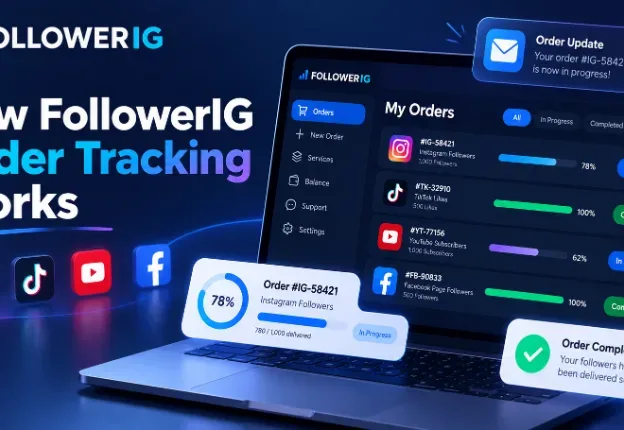
How FollowerIG Order Tracking Works
FollowerIG makes order tracking simple. After placing an order, you can view your order details, check live delivery progress, see service status, and receive email updates when your order is paid and completed.
Summarize This Article with AI
When you place an order online, one of the first questions that comes to mind is simple: “What is happening with my order now?” At FollowerIG, we understand that users want clarity after making a purchase. You should not have to guess whether your order is received, processing, or completed.
That is why FollowerIG includes an easy order tracking system. After placing an order, you can view your order details, check service progress, see delivery status, and receive email updates at important stages.
This guide explains how FollowerIG order tracking works, what you can see inside your dashboard, and how the process helps you stay informed from checkout to completion.
A simple ordering experience from start to finish
FollowerIG is designed to keep the ordering process simple. You can explore different social media growth services, choose the service you want, enter your profile or post link, complete checkout, and then track your order progress.
On the website, this process is explained in three simple steps: choose your service, enter your profile link, and checkout and track order. The goal is to make the experience easy even for users who are placing their first order.
Why order tracking matters
Order tracking gives you confidence after purchase. Instead of wondering what is happening, you can open your dashboard and see the latest status. This is especially helpful when an order contains multiple services or when delivery happens step by step.
What happens after you place an order?
After you complete checkout and your payment is successfully confirmed, your order is created in the FollowerIG system. At this point, the order becomes visible in your dashboard and can be tracked from the order tracking section.
You also receive an email after a successful paid order. This email includes order information and invoice details, so you have a clear record of your purchase. It is useful to keep this email safe in case you want to check your order later.
Your email helps identify your order
When placing an order on the website, your email is important because it helps connect your purchase with you. FollowerIG uses this email to send order notifications, invoice updates, and completion messages.
How to track your FollowerIG order
To track your order, go to your FollowerIG dashboard and open the Track My Orders section. This area shows a list of your orders, including order number, date, payment method, payment status, order status, and total services included in the order.
From the order list, you can select any order to open its details. This is useful when you have placed more than one order or when one order includes multiple services.
Step 1: Go to your dashboard
Start by opening your FollowerIG dashboard. The dashboard gives you access to your account area, order tracking, and other useful sections.
Step 2: Open Track My Orders
Inside the dashboard menu, click on Track My Orders. This section shows all your available orders in one place, making it easier to review your purchase history and current order progress.
Step 3: Select the order you want to view
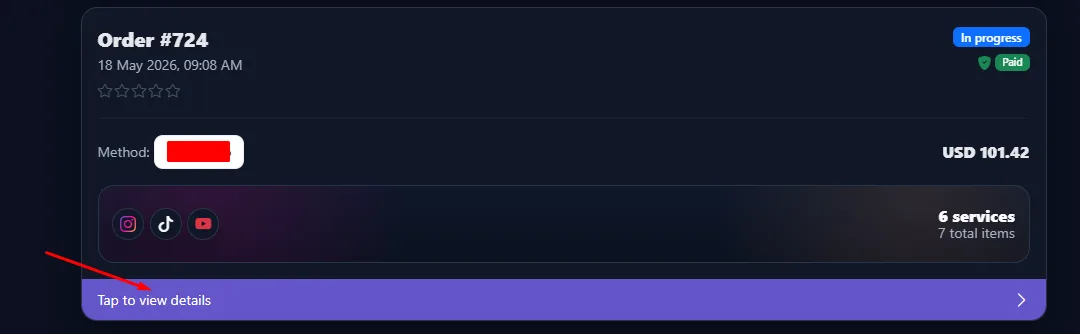
Each order card gives you a quick summary. You can see the order number, order date, payment method, amount, payment status, order status, and the number of services inside the order. To see more details, tap or click the order card.
Understanding the order list
The order list is designed to give you a quick overview before opening full details. For example, you may see an order marked as In Progress with a Paid label. This means the payment has been confirmed and the order is currently being processed.
If an order includes several services, the order card can also show how many services are included. This helps you understand whether the order contains one service or multiple services across different platforms.
Order number
Every order has a unique order number. This makes it easier to identify your purchase when checking your dashboard or contacting support.
Payment status
The payment status tells you whether the order payment has been confirmed. A paid order means the checkout process was successful and the order can move forward.
Order status
The order status shows the current stage of the order, such as in progress or completed. This helps you quickly understand whether the order is still being worked on or already fulfilled.
Viewing live order progress
After opening an order, you can see more detailed progress for the services inside that order. This is where FollowerIG tracking becomes more useful, especially if your order includes followers, likes, views, subscribers, or other social media services such as Instagram follower growth.
The order detail page can show important information such as start count, target count, delivered amount, remaining amount, and delivery progress percentage.
Start count
The start count shows the number recorded before delivery started. For example, if you ordered followers, the start count helps show the original count before the service began.
Target count
The target count shows the amount ordered. For example, if you ordered 1,000 followers, the target count will show 1,000.
Delivered count
The delivered count shows how much has already been completed. This lets you understand how much of the service has been delivered so far.
Remaining count
The remaining count shows how much is still left to deliver. This is helpful when an order is close to completion and you want to see the remaining progress.
Delivery progress percentage
The progress bar gives you a simple visual view of the order delivery. Instead of reading only numbers, you can quickly see whether the service is just starting, halfway complete, almost done, or fully completed.
What “In Progress” means
If your order or service shows In Progress, it means the order is active and delivery is currently being handled. Some services may start quickly, while others may take more time depending on the platform, service type, order size, and delivery conditions.
It is normal for progress to move gradually. For many social media services, natural-looking delivery is better than sudden activity. This helps the process look more balanced and realistic.
Do not worry if progress is not instant
Some users expect everything to complete immediately after payment. In reality, many orders are processed step by step. If your order is marked as in progress, it means the system has received it and delivery is moving forward.
What “Completed” means
When your order or service shows Completed, it means the delivery for that service has been fulfilled. If an order contains multiple services, one service may be completed while another is still in progress.
This is why it is useful to open the order details instead of only checking the main order card. The detail page gives a clearer view of each service inside the order.
You receive an email when the order is fulfilled
FollowerIG also sends an email notification when an order is successfully fulfilled. This helps you stay updated even if you are not checking the dashboard all the time.
Email notifications keep you updated
FollowerIG uses email notifications to keep the order experience clear. After a successful paid order, you receive an email with your order and invoice information. When the order is completed, you receive another email update letting you know that the fulfillment process is finished.
These emails are useful because they give you a record of your purchase and help you stay informed without needing to constantly refresh the website.
Check the correct email inbox
Make sure you check the email address you used during checkout. If you do not see the email, also check your spam, junk, or promotions folder. Sometimes automated order emails can land there depending on your email provider.
Tracking orders with multiple services
Sometimes one order may include more than one service. For example, a user may order services for different platforms or combine followers, likes, views, or other growth services in a single checkout, including different YouTube growth services.
In this case, the order detail page becomes very helpful. You can view each service separately and check its individual status and progress. One service may be completed earlier, while another may still be in progress.
Each service can have its own progress
Different services can move at different speeds. This does not always mean there is a problem. Service type, quantity, platform behavior, and delivery method can all affect how quickly progress appears.
Why live tracking improves trust
Order tracking is not only a technical feature. It is also about trust. When users can see progress clearly, they feel more comfortable after purchase. It reduces confusion and gives a better customer experience.
For social media growth services, transparency is important. Users want to know what they ordered, how much has been delivered, how much remains, and whether the order is still active. FollowerIG’s tracking system is designed to make this information easy to understand.
Clear progress reduces confusion
A progress bar, delivered count, remaining count, and status labels make it easier to understand the order without contacting support every time. This saves time and gives users more control over their order experience.
What to do if you think something is wrong
If your order seems delayed, the first step is to open the order detail page and check the current status. Look at the delivered count, remaining count, and progress percentage. Sometimes an order is moving, but slowly.
If the order has not changed for a long time or you entered the wrong profile or post link, you can contact FollowerIG support with your order number. Sharing the order number helps the support team check your order faster.
Use your order number when contacting support
Whenever you need help, include your order number and the email used during checkout. This makes it easier to find your order and provide the right support.
Tips for a smooth order experience
To avoid delays or confusion, always enter the correct profile, post, video, or page link when placing your order. Make sure the account or content is public if the service requires public access. Also, use an email address that you can access, because important order updates are sent there.
It is also a good idea to avoid making major changes to your profile or content while an order is in progress. For example, changing usernames, deleting posts, or making the account private may affect delivery depending on the service type.
Double-check your details before checkout
Before completing payment, review your selected service, quantity, link, and email address. A few seconds of checking can prevent unnecessary delays later.
Final thoughts
FollowerIG order tracking is built to make the customer experience easier and more transparent. From the moment your payment is confirmed, you can track your order, open details, check delivery progress, and receive important email updates.
Whether your order contains one service or multiple services, the tracking system helps you understand what is happening at each stage. You can see what has been delivered, what is remaining, and when the order has been completed.
The goal is simple: give users a clear, smooth, and trustworthy order experience from checkout to completion.
Was this helpful?

Sami Khan
I am a content writer specializing in influencer marketing and digital brand growth. I decode creator economy trends, campaign strategies, and audience engagement to help brands build authentic partnerships that actually convert. My goal is to turn the noise of social media into actionable insights for modern marketers.
Related articles
Manson Gray’s 4,000 Watch-Hour Order: Her Delivery and Monetization Experience
Manson Gray ordered 4,000 watch hours on 25 September 2026. She reports reaching 4,300 total watch hours and receiving monetization approval on 2 October.

Do YouTube Shorts Help Long-Form Videos? What to Measure
YouTube Shorts can introduce people to your channel, but views and subscribers do not guarantee long-form viewing. Learn how to connect related videos and measure whether your audience follows through.

TikTok Views vs Engagement: What Counts and How to Measure Results
More TikTok views do not always mean more likes, followers or sales. Learn how to measure engagement, compare promotion options and assess campaign results alongside delivery and refill coverage.

